Renovation Reconnected
The workspace for your next chapter
Less admin. More room to build.
Setout brings a renovation or interior design business into one workspace: quotations, client signatures, changes and finance, from the first walkthrough to the final handover. One connected workflow. From site visit to handover.
Card required to start. Nothing is charged for 14 days; on day 15 your card is charged for the plan you chose, and it renews monthly or yearly until you cancel. One free trial per firm. Your records export to spreadsheet whenever you want them.
Where the hours go
Type it once. Use it through to handover.
Most of the admin in a renovation or interior design business is the same job details typed again: the quotation into the contract, the contract into the claim, the claim into the final account. Setout carries them forward, so those hours go back to your clients and your sites.
- Quotation
- Signed contract
- Variation order
- Progress claim
- Final account
One set of job details, carried through every document.
Instead of rebuilding the quotation for every revision
Change a line, not the whole document.
Edit scope, quantities and rates in one builder. Subtotal, discount and tax rework themselves, and the figure on screen is the figure that prints.
How quotations workInstead of printing, signing, scanning and filing
Approval without the paperwork run.
Send one link. Your client reviews, signs and accepts on their phone, and the signed copy stays with the job.
How signing worksInstead of writing up every change from a blank page
A change starts from the signed contract.
Raise a variation order against the quotation your client already signed. Nobody retypes the job or compares two documents by hand.
How variations workInstead of working out each progress claim by hand
Claims that already know the amount.
Set the payment stages once, as percentages of the job. Each progress claim is raised from its stage, and a confirmed variation is shared across the stages still to come.
How claims workInstead of reconciling the job in a spreadsheet at handover
A final account that adds itself up.
Contract sum, variations, what you have claimed and what is still owed, kept current on the job as the work goes on.
See the final accountInstead of asking who has the latest version
Pick up any job where it stands.
Every job keeps its quotations, files, tasks and activity together, so whoever takes it over sees the work and the next step.
How projects work
How much time you get back depends on how your firm works today.
Setout in a minute
A quick word from the people building it.
You lose real hours to admin: scattered site notes, one more change from a client, a quotation rebuilt from scratch. Setout is being built around how a design or renovation project actually runs, from scope and quotations through approvals, variation orders and progress claims, so you keep the final say and get more time for your clients, your team and the spaces you are building.
A short introduction, 0:49. Not a product demo.
Product tour
Two minutes. The whole workflow.
A narrated walkthrough of quoting, signing and getting paid, start to finish, in one connected workspace, shown with fictional training records.
Illustrative walkthrough. Fictional demo records, 1:51. Features depend on plan.
02 / Capture the conversation
Start on site. Keep the detail.
Record the walkthrough with your client's consent, as audio or as audio and video, and keep the conversation attached to the job it belongs to. The details stop living in a notebook somebody half remembers.
On Professional and EnterpriseConsent is confirmed before recording starts. Fictional demo records.

03 / Transcribe & review
Conversation in. Clearer scope out.
AI turns the recording into a transcript and pulls out the scope, sorted into what was agreed, what the client requested and what was only mentioned. You check each item against the conversation before anything reaches a price.
On Professional and EnterpriseExample scope. Check each item against the source conversation.
Recording → transcript → scope
- AGREED
- Replace kitchen cabinets
- REQUESTED
- Add task lighting
- MENTIONED
- Consider a new splashback
04 / Your AI assistant
A little guidance. A lot less searching.
Ask about the screen you are on, get step-by-step guidance, and jump straight to the right workflow. Start the day with a brief of what needs your attention.
On Professional and EnterpriseSuggestions are drafts. You decide what is saved or sent.
Maple Walk apartment
What should I do next on this job?
Q-204 is confirmed and the deposit is paid. The next stage, On commencement (30%), has no claim yet.
05 / Projects, files & tasks
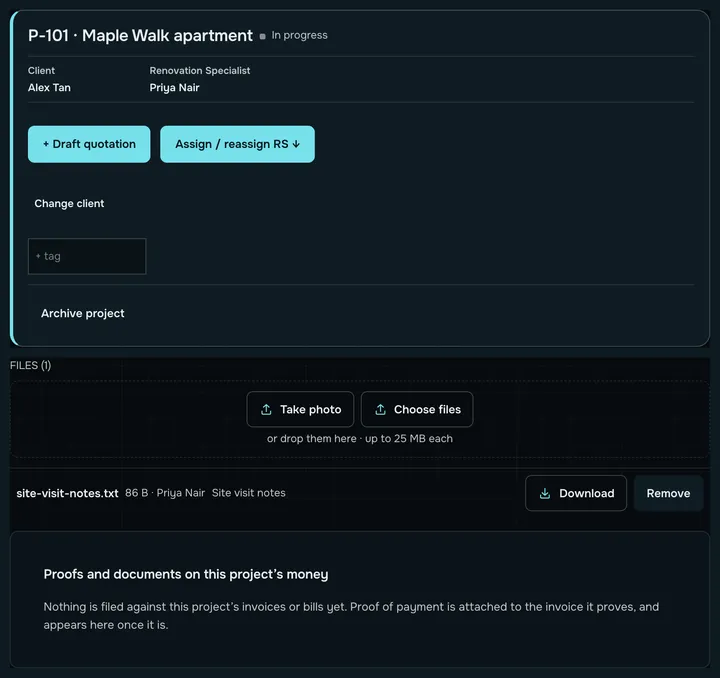
Keep the team on the same page.
Every job keeps its quotations, files, tasks and activity in one workspace, so whoever picks it up sees the work and the next step together.
Fictional demo project.
06 / Quotations
Every line. Clearly priced.
Build detailed quotations with scope, quantities and pricing. Check the subtotal, discount and tax as separate lines before you share the client copy, and the figure on screen is the figure that prints.
Fictional demo quotation. Tax is added only when your business is GST-registered.

07 / Client digital signing
One link. Signed on their phone.
Share a quotation link. Your client reviews the scope and terms, types their name, draws their signature and accepts, straight from their phone and without creating an account.
Illustrated signing flow. Fictional client.
Shared quotation
Review scope + terms
Signature + acceptance recorded
08 / Client requests & variations
Catch the change. Keep the context.
When a client asks for something extra, your team reviews the request and prepares a variation order against the original signed contract, so the client sees what changed rather than a second quotation to compare by hand.
Variation orders on every plan. Request flagging on Professional, from client messages your team pastes in.Illustrative request. Your team confirms pricing and sending.
- Can we add a shelf above the desk?
- Confirm it is new work, then price it.
- VO-1 · against signed quotation Q-204
09 / Claims, payments & expenses
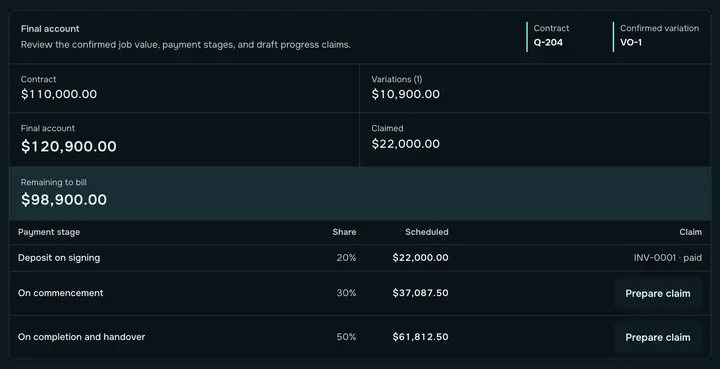
Keep the money connected to the job.
Follow the payment stages set when the contract is signed, raise progress claims and log payments as they arrive. Track expenses against each job for a clearer view of what it really costs.
Fictional demo figures.
10 / Finance team workspace
Collections. Costs. Payouts in view.
Give finance a connected workspace. Track supplier bills and petty cash, review payment status and payout readiness, and check your records against Xero, each behind the right permissions.
Professional. Xero connected.Features depend on plan, permissions and connected services.
- Expenses
- Supplier bills + petty cash
- Payment control
- Payment status + payout readiness
- Xero check
- Review accounting records
11 / From first conversation to handover
AI supports. Your team decides.
AI transcribes, drafts and flags. People confirm the scope, set the price and choose what is sent. An AI suggestion stays a draft until someone on your team accepts it.
AI features on Professional and EnterpriseReview the details before confirming or sharing.
- Capture
- Prepare
- Deliver
Pricing
Every plan quotes, invoices and gets paid.
Every plan keeps quoting, invoicing and getting paid. Upgrades buy leverage, never permission to run your business.
| EssentialsS$149/month | ProfessionalS$299/month | EnterpriseTalk to us | |
|---|---|---|---|
| Quotations and variation orders | Included | Included | Included |
| Progress claims and invoices | Included | Included | Included |
| PayNow scan-to-pay on every invoice | Included | Included | Included |
| Client portal links and e-acceptance | Included | Included | Included |
| Your logo and brochure pages on every quotation | Included | Included | Included |
| Export everything to spreadsheet | Included | Included | Included |
| AI drafting and scope screening | Not included | Included | Included |
| Site-visit recordings and transcripts | Not included | Included | Included |
| Xero sync | Not included | Included | Included |
| Coming soon: your own WhatsApp Business number, for client replies, delivery receipts and sending from the app | Not included | Soon | Soon |
| Conversion and win-rate reporting | Not included | Included | Included |
| Automated lead capture | Not included | Included | Included |
| Your own branding | Not included | Not included | Included |
| Priority support | Not included | Not included | Included |
| Onboarding and migration from your current system | Not included | Not included | Included |
Prices are in Singapore dollars. We are not registered for GST, so no GST is added. Billed monthly or yearly. Card required to start. Nothing is charged for 14 days; on day 15 your card is charged for the plan you chose, and it renews monthly or yearly until you cancel. One free trial per firm. Cancel from the billing portal inside the app, without emailing anyone.
Make room for the work that matters
Your next project. Better connected.
For renovation and interior design teams. Quotations. Signatures. Finance. setoutco.com
Cancel from the billing portal whenever you like, and your data exports whenever you ask.